Sharing an Instagram collection when Instagram won’t let you
Instagram has a “Collections” feature — you can save reels and posts into named folders. Handy for yourself. Useless for anyone else, because there’s no way to share a collection with another person. No link, no export, nothing.
I wanted to share a list of handstand, acro and Berlin reels with a few people without forwarding forty individual links one by one. So I built the sharing feature Instagram doesn’t have: a Telegram bot that catches links and a small webpage that plays them back.
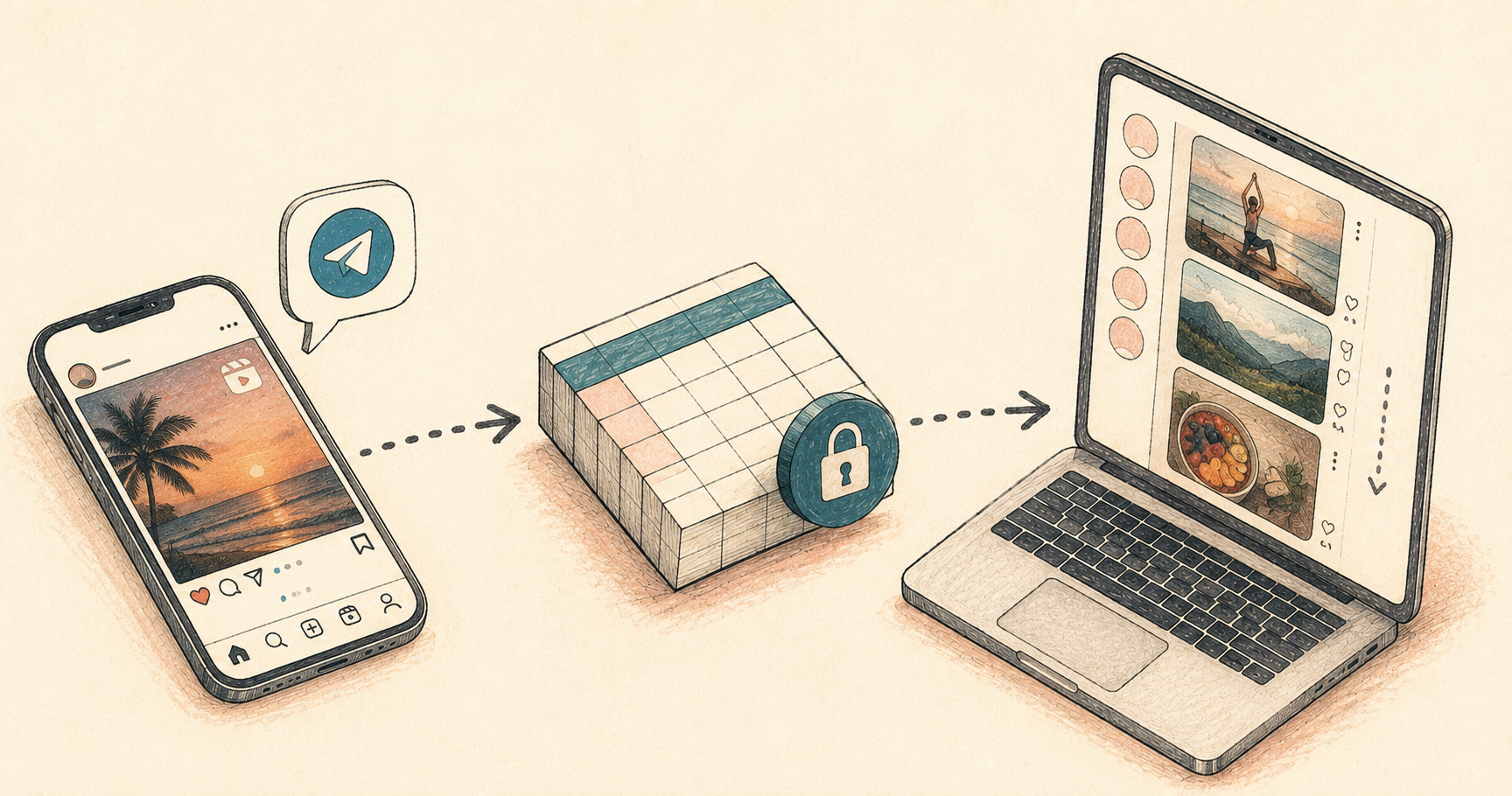
The shape of it
Three pieces, each doing one boring, obvious thing:
- A Telegram bot — you forward or paste an Instagram link into a chat with it
- A Google Sheet — acts as the database, because I didn’t want to run one
- A static webpage — reads the sheet and shows the posts as a scrollable feed
Nothing in this stack is exotic on purpose. No server-side app, no auth system, no database to back up. A sheet and a static HTML file.
The bot
Built with python-telegram-bot and gspread. When you send it a message, it:
- pulls out any
instagram.com/reel/...,/p/..., or/tv/...links with a regex - reads hashtags in the same message as tags
- treats the rest of the text as a caption
- appends a row to the sheet:
id, collection, url, date_added, added_by, caption, tags, type, status
You can run /collection berlin to switch which collection new links land in, so one bot can serve several separate collections instead of one bucket for everything.
Writing to the sheet needs a Google service account — a machine identity you share the sheet with as an editor, separate from your own Google login. Free, no billing account needed, just a few clicks in Google Cloud Console.
The “database”
A Google Sheet, with two separate permission layers doing two separate jobs. The bot writes through a Google service account — a private machine identity shared on the sheet as an editor, never exposed publicly. The viewer only reads, and reading needs the sheet set to “anyone with the link can view,” since the static webpage has no login of its own. Write access stays private; read access is link-only, not indexed or discoverable. No API server, no ORM, no migrations. The read side is one URL:
https://docs.google.com/spreadsheets/d/{SHEET_ID}/gviz/tq?tqx=out:csv&sheet={TAB_NAME}
That endpoint returns clean CSV, CORS-friendly. The frontend fetches it directly — no backend of its own at all.
The viewer
A single HTML file. It renders each row as an Instagram embed, using Instagram’s own embed.js widget — the same one WordPress and every blog uses. No API key required for basic embedding, which matters because Instagram locked down almost everything else years ago.
I originally built a grid view too, styled like Instagram’s profile grid. Turned out to be pointless: without an authenticated oEmbed call, there’s no way to get real thumbnail images, so the tiles were just colored placeholder squares. A grid of colored squares tells you nothing. Cut it. The scroll feed — real embedded posts, lazy-loaded as you scroll so it doesn’t try to render fifty iframes at once — was the only view actually worth keeping.
Collections are switchable via pills at the top, and the whole thing is deep-linkable:
index.html?berlin
index.html?collection=berlin
Either form opens straight into that collection, which is the entire point — a link you can actually hand to someone.
Where it lives
Code’s here: github.com/rcsmit/python_scripts_rcsmit/tree/master/instacollector
Bot, viewer, setup script, and a README that walks through the Google service account setup, which is the only genuinely fiddly part of the whole thing.
The README file is also shown below.
How to make the Instagram Collector Telegram Bot
Goal: Send Instagram links to this bot; it appends them as rows to your Google Sheet (InstaCollections) so a JS page can read and display them.
1. Create the Telegram bot
- Open Telegram, message @BotFather.
/newbot, follow the prompts, get your bot token.
2. Create a Google service account (so the bot can write to the sheet)
- Go to https://console.cloud.google.com/ → create/select a project.
- Enable the Google Sheets API.
- Go to IAM & Admin → Service Accounts → Create Service Account.
- Create a key for it (JSON) and download it as
service_account.json. - Open your sheet, click Share, and share it with the service account’s email (looks like
xxx@xxx.iam.gserviceaccount.com) as Editor.
3. Install dependencies
pip install -r requirements.txt --break-system-packages
4. Configure the bot
Run the setup script — it asks for each value and writes a .env file next to the bot (the bot loads it automatically on startup):
python setup_env.py
It’ll ask for:
- Telegram bot token (from @BotFather)
- Google Sheet ID (defaults to your InstaCollections sheet)
- Worksheet/tab name (defaults to
Blad1) - Path to your
service_account.jsonkey file - Default collection name
- Allowed Telegram user IDs (optional — leave blank while testing; get your numeric ID by messaging @userinfobot on Telegram)
Re-run python setup_env.py any time to update a value; it shows your current settings as defaults. The .env file is written with restricted permissions (readable only by you) since it holds your bot token — never commit it to a public repo.
5. Run it
python insta_collector_bot.py
Keep it running (screen/tmux, systemd, or a small always-on VPS/Fly.io/ Render worker — must be a long-running process, not serverless, since it polls Telegram).
How to use it in Telegram
/collection acro-italy— new links you send now go into the “acro-italy” collection (so you can run several collections through one bot/sheet)./whoami— shows the active collection./list— shows the last 5 links in the active collection.- Just send or forward a message containing an Instagram post/reel/IGTV link. Any
#hashtagsin the same message become thetagscolumn; the rest of the text becomes thecaption. - Multiple Instagram links in one message are all added.
Each row gets: id, collection, url, date_added, added_by, caption, tags, type, status — matching your sheet’s header exactly. status is always set to active on add; you can flip it to hidden by hand in the sheet to soft-delete something without your JS page showing it (have the page filter on status == "active").
Notes
- Only Telegram users in
ALLOWED_USER_IDScan add links, if you set that variable. Leave it unset while testing, then lock it down once you know who should be allowed to contribute. - The bot doesn’t download or re-host video — it only stores the link, which keeps you clear of Instagram’s redistribution restrictions and is what your oEmbed-based JS page needs anyway.
chat_state.json(which collection is “active” per chat) is created next to the script; back it up or setSTATE_FILEto a persistent path if you’re deploying somewhere with an ephemeral filesystem.
Deploying to Railway (keep it running 24/7)
Railway runs this as a long-lived background worker, so it stays connected to Telegram continuously rather than relying on your own laptop being on.
- Push this folder to a GitHub repo.
.gitignorealready keeps.envandservice_account.jsonout of it — don’t remove those entries. - On railway.com, create a new project → Deploy from GitHub repo → select your repo.
railway.jsontells Railway to runpython insta_collector_bot.pyand always restart it if it stops (restartPolicyType: ALWAYS) — that matters here since a polling bot should never sit “stopped”. - Open the deployed service → Variables tab → add:
TELEGRAM_BOT_TOKENSPREADSHEET_IDWORKSHEET_NAMEDEFAULT_COLLECTIONALLOWED_USER_IDS(optional)GOOGLE_SERVICE_ACCOUNT_JSON— paste the entire contents of yourservice_account.jsonkey file as one value (Railway has no file-secret mount, so the bot reads credentials straight from this variable when it’s set — seeGOOGLE_SERVICE_ACCOUNT_JSONin the script).- You do not need
GOOGLE_SERVICE_ACCOUNT_FILEon Railway.
- Railway deploys automatically on push. No domain/networking setup is needed — this service makes outbound calls to Telegram, it doesn’t need to receive inbound HTTP traffic.
- Check logs in the Railway dashboard to confirm “Bot starting (polling)…” appears and there are no auth errors.
Redeploy any time by pushing to the connected branch — Railway rebuilds and restarts the worker automatically.