How I Track My Money Across Multiple Accounts, Currencies and Countries
I work seasonal jobs in Europe and spend the winters in Southeast Asia, so my money lives in a Dutch current account, a savings account, a credit card, a multi-currency app, an online wallet, a money-transfer service and, most of the time, a wallet full of local cash.
No budgeting app handles that well. Banks only see their own account, apps get confused by cash in four currencies, and none of them know that the €820 that left my bank and the 28,500 baht I handed over for a room are the same money. So I built my own system: one long table of entries, a handful of codes per line, and a set of checks that tell me when something does not add up.
I want one place that shows all of it, in euros, and tells me what a month in Chiang Mai really costs compared to a month in the Netherlands.
View it in action here: https://rcsmit.github.io/kasboek/ (download the Excel file in the GitHub folder below and drag it to the website).
Find the example file here: https://github.com/rcsmit/rcsmit.github.io/tree/master/kasboek
A warning before you start. This system takes a lot of effort and discipline. Every receipt, withdrawal and transfer has to be entered, often daily, and every transfer needs two legs that match to the cent. It also takes some logical thinking: for each line you have to decide where the money came from, where it went and whether it was really spent. If you skip a few days or guess, the checks will tell you, and finding the mistake later costs more time than entering it right the first time.
This post explains the whole system, with most of the space going to transfers: money that moves without being earned or spent. Get those wrong and every total is wrong. Get them right and the books balance to the cent across years and currencies.
Everything here is anonymised. Account numbers, names and amounts in the examples are made up.
Contents
The ENTRIES table
Four layers of classification
Getting the data in
Sources: real money and helper accounts
The golden rule of TRANSFER
Every TRANSFER case I have run into
· A. Between my own sources
· B. Parked with someone else
· C. Owed to me or by me
· D. Pass-through and look-alikes
Foreign currency and counting cash
Opening balances, year end and zero-amount rows
Checks that keep the books honest
Common mistakes
The example workbook
Appendix A: Is this double-entry bookkeeping?
Appendix B: The helper file
The ENTRIES table
Everything lives on one tab called ENTRIES: one row per money movement, newest at the bottom, with twelve columns that matter. Other tabs (pivots, rules, per-day stats) only read from it. A row records what happened to one source: a bank account, a card, a wallet, a pile of cash. A purchase is one row. A transfer between two of my sources is two rows.
| Column | What goes in it | Example |
|---|---|---|
| id | A number shared by all rows that belong to one event. The two legs of a transfer, or a payment split over three categories, carry the same id. | 202611042 |
| source | Where the money sits: an account, card, wallet, cash pile or helper account. | CASH_THB |
| date | The day it happened on that source, not the day I typed it in. | 2026-11-16 |
| amount | In euros, signed from the point of view of the source: plus = in, minus = out. | -6.77 |
| description | Free text, usually the counterparty or what I bought. | ATM fee |
| type | The first classification layer: IN, OUT, TRANSFER and a few more. | OUT_ASIA |
| group | The second layer: a budget group such as GROCERIES or FIXED_COSTS. | ASIA_DAILY |
| category | The third layer: the specific item, such as storage_unit or espresso. | bank_fees_asia |
| daily_code | A short code for daily spending abroad: bf, l, d, c, h and so on. | misc |
| fx_amount | The amount in the local currency, signed like amount. Empty for euro rows. | -250 |
| currency | The ISO code of fx_amount. | THB |
| rate | Local currency per euro on that row. | 36.91 |
Three rules keep the table usable:
- Amount is always euros. For a foreign-currency row I store the local amount in fx_amount and the rate in rate, and amount = fx_amount ÷ rate. Totals then work across currencies without lookups.
- Sign follows the source. Money leaving my wallet is negative, even when it is a refund I am passing on. There is no separate debit and credit column.
- One id per event. When a bank line is split over categories, or a transfer has two legs, the rows share an id so I can find and check them together.
Four layers of classification
Each row gets up to four labels, from coarse to fine:
- type,
- group,
- category
- daily code (for spendings in Asia)
The type decides whether a row counts as income, spending or neither; the other three only matter for reports.
Type
| Type | Meaning | Counts in |
|---|---|---|
| IN | Money I earned or received for keeps: salary, benefits, tax refunds, interest, gifts. | Income |
| OUT | Daily life in the Netherlands and Europe. | Spending, Europe |
| OUT_FIXED | Fixed costs that run all year wherever I am: insurance, phone, subscriptions, storage. | Spending, fixed |
| OUT_ASIA | Daily life during the winter in Asia. | Spending, Asia |
| OUT_ASIA_FLIGHTS | Flights to and from Asia. | Spending, Asia |
| OUT_ASIA_INSURANCE | Travel insurance for the trip. | Spending, Asia |
| OUT_ASIA_PREPAID | Visa, vaccinations and other things paid before leaving. | Spending, Asia |
| TRANSFER | Money moving between my own sources, or parked with someone else. | Nothing: must net to zero |
| OPENING_BALANCE | The balance of a source on the day I started tracking it. | Net worth only |
| PAPER_GAIN_LOSS | Revaluation of something I hold, such as crypto, without buying or selling. | Net worth only |
| UNCATEGORISED | Imported, not yet labelled. | Spending, flagged |
The split of OUT into Europe, fixed and Asia is the whole point of the system. It answers the question I care about: how many days in Asia does a month of seasonal work buy?
Group and category
The group is a budget bucket; the category is the line item inside it. I keep the list short and stable so years stay comparable.
| Group | Typical categories |
|---|---|
| SALARY | salary, holiday_pay, benefits, side_income |
| TAX_REFUNDS | income_tax_refund, health_allowance_back |
| INTEREST | interest |
| MISC_IN | gifts_received, sold_items |
| GROCERIES | groceries, groceries_seasonal_job, protein_powder |
| EATING_OUT | espresso, restaurant, snacks, day_trips |
| MISC | misc, gifts_given, books, bank_fees, fx_costs |
| CLOTHING_CARE | clothing, haircut, dentist, pharmacy |
| TRAVEL_NL | public_transport, train |
| TRAVEL_EUROPE | flights_europe, hostel_europe |
| FIXED_COSTS | health_insurance, phone_internet, storage_unit, subscriptions, hosting |
| ASIA_DAILY | daily_spending, housing, scooter, bank_fees_asia |
| ASIA_MISC | medical_asia, gear, tours |
| ASIA_FLIGHTS | flights, flights_unused |
| ASIA_PREP | travel_insurance, visa, vaccinations |
| PREPAID_UNUSED | accommodation_unused |
| TRANSFER | transfer, deposit, fraud |
Daily code
In Asia I log almost every receipt from cash. The daily code tells me what a day is made of, without inventing fifty categories.
| Code | Meaning | Code | Meaning |
|---|---|---|---|
| bf | Breakfast | h | Housing |
| l | Lunch | scoot | Scooter rent and fuel |
| d | Dinner | taxi | Taxi or ride-hailing |
| c | Coffee | tix | Bus, train, ferry tickets |
| s | Snacks and drinks | yoga | Classes |
| alc | Alcohol | lndry | Laundry |
| tour | Sights and entry fees | tip | Tips |
| visa | Visa extension | misc | Everything else |
| diff | Cash count difference | in | Cash coming in (withdrawal) |
Getting the data in: bank CSVs and a rule-based categoriser
Nothing flows into my books automatically. Once a month I download every statement as a CSV, paste the rows into ENTRIES by hand, and let a small Python script label most of them. Cash in Asia I type in from receipts and notes, usually the same evening.
The monthly routine
- Download. From each online banking site or app I export the period since my last import as CSV: current account, savings, credit card, every currency pocket of the multi-currency app, the online bank and the online wallet.
- Fix the odd export. Not every export is clean. The online wallet, for example, writes dates as month/day/year. A few lines of Python rewrite that column to day/month/year before I touch the file.
- Paste by hand. I copy the rows to the bottom of ENTRIES and line up the columns: date, amount, counterparty into description, and the account as source. Doing this by hand is slower than an import macro, but I see every line once, and that is when I spot the odd charge.
- Run the categoriser. The script fills type, group and category for every row it recognises (below).
- Label the rest. Whatever it did not recognise, I label myself. If the same counterparty comes back, I add a rule so I never label it again.
- Pair the transfers. Transfers from the bank side get their second leg on the other source with the same id, and then the checks run.
Sources: real money and helper accounts
A source is anything that has a balance: if I can ask “how much is in it?”, it is a source. That includes things that are not accounts at all, like the money a friend owes me or a room I paid for months ahead. The running total of amount per source must always equal what is really there.
In my own file bank accounts use their full account number as the source name, so a bank CSV export can be matched line by line. In this post and the example they are replaced by readable names.
Real sources
| Source | What it is | Checked against |
|---|---|---|
| BANK_CURRENT | Current account; salary in, most bills out | Bank statement |
| BANK_SAVINGS | Savings account | Bank statement |
| BANK_PENSION | Pension savings, filled monthly and not to be touched until retirement; the dashboard shows a second total without it | Bank statement |
| CREDIT_CARD | Credit card, settled monthly from BANK_CURRENT | Card statement |
| FOREIGN_BANK | Small account in another EU country for a seasonal job | Statement |
| MULTI_EUR, MULTI_THB, MULTI_VND | Multi-currency app, one source per currency pocket | App export per currency |
| BANK_ONLINE | Online bank and international money-transfer service | App history |
| ONLINE_WALLET | Online payment wallet | Activity export |
| CASH_EUR, CASH_THB, CASH_VND, CASH_USD, CASH_AED | Physical cash, one source per currency | Counting it |
| CRYPTO | A small crypto holding | Exchange app |
Helper sources
Helper sources hold money that is mine (or that I owe) but not in any account. They are what make the hard transfer cases work, and each one has to come back to zero, or to a known amount, eventually.
| Source | Holds | Back to zero when |
|---|---|---|
| DEPOSITS | Deposits held by landlords and scooter rentals | The deposit comes back (inverse amounts), or is kept and becomes a cost |
| RECEIVABLES | Money owed to me by an organisation: an insurance claim, a benefit already earned, fraud the bank will refund | The money arrives |
| PAYABLES | Money I owe to someone who paid for me | I pay them back |
| PREPAID | Services paid ahead: a room for next season | The service is used, or written off |
| INSURER_POT | Monthly instalments of my health insurance deductible, held by the insurer | The insurer settles the year |
| PERSON_A | Loans to and from one friend | The loan is repaid or forgiven |
| TAB_FRIEND_B | Cash I gave a friend who pays for me with her QR code | The tab is used up |
| FX_DIFF | Small rounding differences when someone pays me back | I clear it to fx_costs |
| RECLASS | Bookkeeping-only moves between categories | Always zero, by construction |
| SUSPENSE | Money I cannot place yet | I find out what it was |
| STATS_ONLY | Zero-amount rows that only carry local-currency details | Always zer |
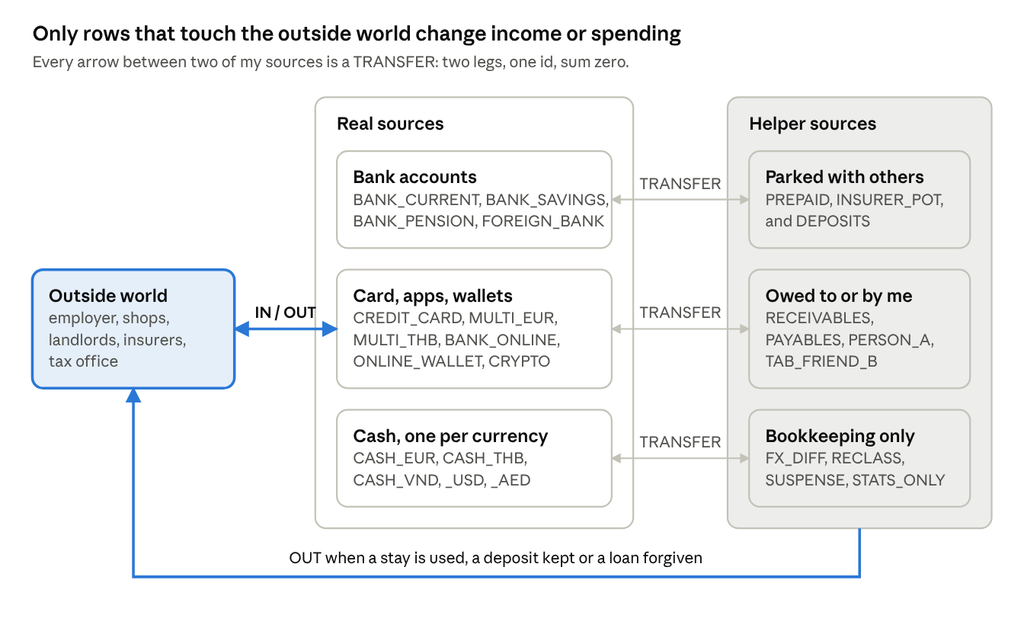
Money only enters or leaves my books through the outside world; everything between the boxes on the right is a transfer. Helper sources hand money back to the outside world only when something is actually consumed or lost.
The golden rule of TRANSFER
A transfer moves money between two of my sources, so it is always two rows that add up to exactly zero. One leg is negative on the source the money leaves, the other is positive on the source it lands on, and both carry type TRANSFER, group TRANSFER and the same id.
| id | source | amount | type | category |
|---|---|---|---|---|
| 7001 | BANK_CURRENT | -300.00 | TRANSFER | transfer |
| 7001 | BANK_SAVINGS | 300.00 | TRANSFER | transfer |
Because income and spending only look at IN and the OUT types, this pair changes no report. It only changes where the money sits. Three consequences follow:
- The sum of all TRANSFER rows is zero. Over the whole file, to the cent. This is the single most useful check I have; a pivot of amount by type shows it at a glance.
- Each id sums to zero. If the total is off, grouping TRANSFER rows by id finds the broken pair: a leg typed twice, a leg missing, or a sign flipped.
- Each month usually sums to zero. When it does not, it is almost always a pair that crosses a month boundary on purpose: a transfer sent on the 31st that lands on the 2nd. Those two months cancel each other out.
Is it a transfer?
When a line comes in, I ask three questions in order:
- Did my net worth change? If I paid a shop, earned money or lost money, no: it is IN or OUT. If the money only moved, go on.
- Is the other side one of my sources? If yes, it is a transfer and I need both legs. If the other side is a person or company that will give the money back (a deposit, a loan, a prepaid room), I create or reuse a helper source so that the other side becomes one of mine.
- Is any part of it a cost? Fees, exchange margins and the part of a loan I forgive are not transfers. I split them off into their own OUT row, with the same id, so the transfer legs stay equal and opposite.
The third question is where most errors come from. A €100 transfer that arrives as €99.50 is not a €100 transfer: it is a €99.50 transfer plus a €0.50 cost.
Every TRANSFER case I have run into
Twenty-nine cases cover every transfer I have met in years of keeping these books. They fall into four families: money moving between my own sources, money parked with someone else, money owed, and things that look like transfers but are not. The overview comes first; after it, each case shows the exact rows in euros, as they appear in the example workbook (same ids, same case codes).
All cases at a glance
| Case | What happens | Helper source | Part that is not a transfer |
|---|---|---|---|
| T01 | Saving | ||
| T02 | ATM at home | ||
| T03 | ATM abroad | ATM fee (negative) | |
| T04 | Exchange in an app | ||
| T05 | Card settlement | The purchases | |
| T06 | Online bank top-up | Service fee, rent | |
| T07 | Arrives short | Transfer fee | |
| T08 | Cash-to-cash exchange | ||
| T09 | Crosses a month | ||
| T10 | Rate adjusted by hand | ||
| T11 | Deposit | DEPOSITS | |
| T12 | Card fraud | RECEIVABLES | |
| T13 | Deductible instalments | INSURER_POT | Deductible used |
| T14 | Prepaid, used | PREPAID | The stay |
| T15 | Prepaid, unused | PREPAID | The write-off |
| T16 | Crypto | CRYPTO | Revaluation |
| T17 | Insurance claim | RECEIVABLES | Cost and claim |
| T18 | Pay earned, paid later | RECEIVABLES | The income |
| T19 | Friend paid for me | PAYABLES | My share |
| T20 | Bought for a friend | PERSON_A, FX_DIFF | |
| T21 | Loan, partly forgiven | PERSON_A | Forgiven part |
| T22 | Tab with a friend | TAB_FRIEND_B | The purchases |
| T23 | Groceries for my parents, paid next month | RECEIVABLES | Receipt and their part |
| T24 | Passing money on | ||
| T25 | Cash swap | ||
| T26 | Shared bill | All of it | |
| T27 | Reclassification | RECLASS | All of it |
| T28 | Unknown money | SUSPENSE | Once identified |
| T29 | Clearing FX_DIFF | FX_DIFF | All of it |
Two habits run through every case with a foreign currency. First, I adjust the rate on a transfer leg by hand so that the euro amount is exactly the same on both sides; the rate takes the difference, never the euros. Second, the description of a transfer holds both amounts, such as “277.70 EUR = 10,250 THB”, so the real exchange stays readable.
A. Between my own sources
T01 · Saving: current account to savings
The classic pair. Two legs, same id, opposite amounts.
| id | date | source | amount € | description | type | category |
|---|---|---|---|---|---|---|
| 101 | 2025-11-01 | BANK_CURRENT | -300.00 | to savings | TRANSFER | transfer |
| 101 | 2025-11-01 | BANK_SAVINGS | 300.00 | to savings | TRANSFER | transfer |
| 102 | 2025-12-01 | BANK_CURRENT | -100.00 | monthly to pension savings | TRANSFER | transfer |
| 102 | 2025-12-01 | BANK_PENSION | 100.00 | monthly to pension savings | TRANSFER | transfer |
Nothing is earned or spent, so no report changes. Only the balances per source move.
T02 · Cash from a home ATM
Cash is a source like any other, so a withdrawal is a transfer, not spending.
| id | date | source | amount € | description | type | category |
|---|---|---|---|---|---|---|
| 201 | 2025-11-03 | BANK_CURRENT | -100.00 | ATM withdrawal | TRANSFER | transfer |
| 201 | 2025-11-03 | CASH_EUR | 100.00 | ATM withdrawal | TRANSFER | transfer |
Book the withdrawal on the cash source with the date you took the money out, not the date the bank processes it.
T03 · ATM abroad, with a local ATM fee
Book the transfer at the euro amount the bank charged and the gross local amount; the fee is a negative expense row inside the cash wallet.
| id | date | source | amount € | description | type | category | local |
|---|---|---|---|---|---|---|---|
| 301 | 2025-11-05 | BANK_CURRENT | -277.70 | ATM withdrawal 277.70 EUR = 10,250 THB (10,000 + 250 fee) | TRANSFER | transfer | |
| 301 | 2025-11-05 | CASH_THB | 277.70 | ATM withdrawal 277.70 EUR = 10,250 THB (10,000 + 250 fee) | TRANSFER | transfer · in | 10,250 THB |
| 301 | 2025-11-05 | CASH_THB | -6.77 | ATM fee 250 THB | OUT_ASIA | bank_fees_asia · misc | -250 THB |
The rate on the cash leg is calculated from the withdrawal itself: 10,250 / 277.70 = 36.9103. Every cash payment from this wallet uses that rate. The fee is a separate row with a negative amount, like any other cost; booking it as positive would add money to the wallet instead of taking it out.
T04 · Exchange inside a multi-currency app
One source per currency pocket. The exchange is a transfer between two of them.
| id | date | source | amount € | description | type | category | local |
|---|---|---|---|---|---|---|---|
| 401 | 2025-11-10 | BANK_CURRENT | -250.00 | top up app | TRANSFER | transfer | |
| 401 | 2025-11-10 | MULTI_EUR | 250.00 | top up app | TRANSFER | transfer | |
| 402 | 2025-11-13 | MULTI_EUR | -200.00 | exchanged 200.00 EUR = 7,364 THB | TRANSFER | transfer | |
| 402 | 2025-11-13 | MULTI_THB | 200.00 | exchanged 200.00 EUR = 7,364 THB | TRANSFER | transfer | 7,364 THB |
The euro amount is identical on both legs; only the THB leg carries fx_amount and rate. The rate is again calculated from the exchange: 7,364 / 200.00 = 36.82.
T05 · Credit card: purchase, then monthly settlement
The purchase is the expense, on the card. The settlement from the bank is only a transfer.
| id | date | source | amount € | description | type | category |
|---|---|---|---|---|---|---|
| 501 | 2025-11-08 | CREDIT_CARD | -612.40 | airline, return flight | OUT_ASIA_FLIGHTS | flights |
| 502 | 2025-11-28 | BANK_CURRENT | -612.40 | card settlement previous statement | TRANSFER | transfer |
| 502 | 2025-11-28 | CREDIT_CARD | 612.40 | card settlement previous statement | TRANSFER | transfer |
Booking the settlement as spending would count every card purchase twice: once on the card, once on the bank.
T06 · Top up an online bank, pay a fee, pay rent
Top-up is a transfer; the service fee is an expense; the rent is an expense. Three rows on the online bank, one on the bank.
| id | date | source | amount € | description | type | category | local |
|---|---|---|---|---|---|---|---|
| 601 | 2025-12-01 | BANK_CURRENT | -126.45 | top up online bank | TRANSFER | transfer | |
| 601 | 2025-12-01 | BANK_ONLINE | 126.45 | top up online bank | TRANSFER | transfer | |
| 601 | 2025-12-01 | BANK_ONLINE | -0.45 | service fee | OUT | bank_fees | |
| 602 | 2025-12-01 | BANK_ONLINE | -126.00 | guesthouse December 126.00 EUR = 4,650 THB | OUT_ASIA | housing · h | -4,650 THB |
The online bank’s balance after these rows is zero, just like the app shows.
T07 · A transfer that arrives short
The bank shows one line of -150. I split it: -149.50 transfer and -0.50 fee, same id. The legs stay equal.
| id | date | source | amount € | description | type | category |
|---|---|---|---|---|---|---|
| 701 | 2026-05-02 | BANK_CURRENT | -149.50 | to foreign account (part 1 of bank line -150.00) | TRANSFER | transfer |
| 701 | 2026-05-02 | BANK_CURRENT | -0.50 | international transfer fee (part 2 of bank line -150.00) | OUT | bank_fees |
| 701 | 2026-05-02 | FOREIGN_BANK | 149.50 | received from home account | TRANSFER | transfer |
My bank-statement checker recognises this: one bank line that matches two ledger rows with the same id.
T08 · Cash-to-cash exchange at an airport
Leftover dollars swapped for dirhams during a layover. Both legs in euros, each with its own local amount and rate.
| id | date | source | amount € | description | type | category | local |
|---|---|---|---|---|---|---|---|
| 801 | 2025-11-04 | CASH_USD | -51.24 | exchanged at airport 60 USD = 220 AED (51.24 EUR) | TRANSFER | transfer | -60 USD |
| 801 | 2025-11-04 | CASH_AED | 51.24 | exchanged at airport 60 USD = 220 AED (51.24 EUR) | TRANSFER | transfer | 220 AED |
Each currency has its own cash source. What I spend from the dirhams at the airport are ordinary OUT_ASIA rows on CASH_AED, not part of the transfer.
T09 · A transfer that crosses a month boundary
Each leg gets the date it happened on its own source. January shows -500, February +500, the pair is zero.
| id | date | source | amount € | description | type | category |
|---|---|---|---|---|---|---|
| 901 | 2026-01-31 | BANK_CURRENT | -500.00 | top up app (arrived 2 Feb) | TRANSFER | transfer |
| 901 | 2026-02-02 | MULTI_EUR | 500.00 | top up app (arrived 2 Feb) | TRANSFER | transfer |
The monthly TRANSFER check shows -500 in January and +500 in February. That is expected; the id check shows the pair is fine.
T10 · Rate adjusted so both legs are equal
The app credited 3,690 THB for 100.00 EUR. I set the rate on the THB leg by hand to 3,690 / 100 = 36.90, so both legs are exactly 100.00.
| id | date | source | amount € | description | type | category | local |
|---|---|---|---|---|---|---|---|
| 1001 | 2026-01-15 | BANK_CURRENT | -100.00 | top up 100.00 EUR = 3,690 THB | TRANSFER | transfer | |
| 1001 | 2026-01-15 | MULTI_THB | 100.00 | top up 100.00 EUR = 3,690 THB | TRANSFER | transfer | 3,690 THB |
This is my standard way of handling any exchange: I never let the euro amounts differ. The rate absorbs the difference, and the description holds both amounts so I can always see what really happened.
B. Money parked with someone else
Here the money leaves all my real accounts but is still mine: a landlord holds a deposit, an insurer holds instalments, a guesthouse holds next season’s rent. The trick is the same every time: treat the place where the money waits as a source.
T11 · Deposit paid and returned
A deposit is still mine, so it moves from cash to the helper source DEPOSITS. When it comes back, the same two rows appear with inverse amounts.
| id | date | source | amount € | description | type | category | local |
|---|---|---|---|---|---|---|---|
| 1101 | 2025-11-06 | CASH_THB | -27.09 | scooter deposit 1,000 THB | TRANSFER | deposit | -1,000 THB |
| 1101 | 2025-11-06 | DEPOSITS | 27.09 | scooter deposit 1,000 THB | TRANSFER | deposit | |
| 1102 | 2025-12-30 | DEPOSITS | -27.09 | scooter deposit returned 1,000 THB | TRANSFER | deposit | |
| 1102 | 2025-12-30 | CASH_THB | 27.09 | scooter deposit returned 1,000 THB | TRANSFER | deposit | 1,000 THB |
The return mirrors the payment: what was -27.09 on CASH_THB is now +27.09, and DEPOSITS goes from +27.09 back to zero. If a landlord keeps the deposit, the return row on DEPOSITS becomes a cost (OUT_ASIA, housing) instead of a transfer.
T12 · Fraudulent card charges, reimbursed later
Never spending, so never OUT. The bank owes me the money, so the charges go to RECEIVABLES and come back from there.
| id | date | source | amount € | description | type | category | local |
|---|---|---|---|---|---|---|---|
| 1201 | 2026-02-14 | CREDIT_CARD | -50.70 | unknown merchant 55 USD = 50.70 EUR (fraud) | TRANSFER | fraud | -55 USD |
| 1201 | 2026-02-14 | RECEIVABLES | 50.70 | unknown merchant 55 USD = 50.70 EUR (fraud) | TRANSFER | fraud | |
| 1202 | 2026-02-14 | CREDIT_CARD | -1.01 | FX surcharge on fraudulent charge | TRANSFER | fraud | |
| 1202 | 2026-02-14 | RECEIVABLES | 1.01 | FX surcharge on fraudulent charge | TRANSFER | fraud | |
| 1203 | 2026-03-20 | RECEIVABLES | -51.71 | reimbursement fraudulent charge + surcharge | TRANSFER | fraud | |
| 1203 | 2026-03-20 | CREDIT_CARD | 51.71 | reimbursement fraudulent charge + surcharge | TRANSFER | fraud |
Booked as OUT, fraud would inflate spending for the weeks the bank investigates, then the refund would look like income. If the bank never pays back, the open amount on RECEIVABLES becomes a cost (OUT, misc).
T13 · Health insurance deductible paid in instalments
Instalments go into INSURER_POT. The part actually used becomes a cost; the rest comes back.
| id | date | source | amount € | description | type | category |
|---|---|---|---|---|---|---|
| 1301 | 2026-01-26 | BANK_CURRENT | -37.50 | deductible instalment | TRANSFER | transfer |
| 1301 | 2026-01-26 | INSURER_POT | 37.50 | deductible instalment | TRANSFER | transfer |
| 1302 | 2026-02-26 | BANK_CURRENT | -37.50 | deductible instalment | TRANSFER | transfer |
| 1302 | 2026-02-26 | INSURER_POT | 37.50 | deductible instalment | TRANSFER | transfer |
| 1303 | 2026-03-26 | BANK_CURRENT | -37.50 | deductible instalment | TRANSFER | transfer |
| 1303 | 2026-03-26 | INSURER_POT | 37.50 | deductible instalment | TRANSFER | transfer |
| 1304 | 2026-04-15 | INSURER_POT | -30.00 | deductible used: prescription | OUT | pharmacy |
| 1304 | 2026-04-15 | INSURER_POT | -82.50 | deductible settlement, unused part back | TRANSFER | transfer |
| 1304 | 2026-04-15 | BANK_CURRENT | 82.50 | deductible settlement, unused part back | TRANSFER | transfer |
Some insurers let you pay the yearly deductible in fixed monthly instalments and settle the year afterwards. INSURER_POT always shows what is still with them.
T14 · Room paid months ahead, used later
The cost belongs to the month I sleep there. Until then the money sits in PREPAID.
| id | date | source | amount € | description | type | category | local |
|---|---|---|---|---|---|---|---|
| 1401 | 2025-11-02 | BANK_CURRENT | -180.00 | homestay February, paid ahead | TRANSFER | transfer | |
| 1401 | 2025-11-02 | PREPAID | 180.00 | homestay February, paid ahead | TRANSFER | transfer | |
| 1401 | 2026-02-01 | PREPAID | -180.00 | homestay February (prepaid) 180.00 EUR = 5,400,000 VND | OUT_ASIA | housing · h | -5,400,000 VND |
Without PREPAID, November would look expensive and February free. With it, the cost lands in the season it belongs to.
T15 · Prepaid but never used, partly sold on
Someone takes over the booking and pays me 600. The 220 I do not get back is written off to PREPAID_UNUSED.
| id | date | source | amount € | description | type | category |
|---|---|---|---|---|---|---|
| 1501 | 2026-03-10 | BANK_CURRENT | -820.00 | cabin next winter, paid ahead | TRANSFER | transfer |
| 1501 | 2026-03-10 | PREPAID | 820.00 | cabin next winter, paid ahead | TRANSFER | transfer |
| 1502 | 2026-05-15 | PREPAID | -600.00 | booking taken over by someone else | TRANSFER | transfer |
| 1502 | 2026-05-15 | ONLINE_WALLET | 600.00 | booking taken over by someone else | TRANSFER | transfer |
| 1503 | 2026-05-15 | PREPAID | -220.00 | cabin next winter, not refunded | OUT_ASIA | accommodation_unused · h |
| 1504 | 2026-05-18 | ONLINE_WALLET | -600.00 | wallet to bank | TRANSFER | transfer |
| 1504 | 2026-05-18 | BANK_CURRENT | 600.00 | wallet to bank | TRANSFER | transfer |
PREPAID_UNUSED is its own group so I can see what plans that fell through cost me, separately from normal housing.
T16 · Buying crypto, then a paper loss
Buying is a transfer. A change in value is PAPER_GAIN_LOSS: it moves net worth, not spending.
| id | date | source | amount € | description | type | category |
|---|---|---|---|---|---|---|
| 1601 | 2026-05-10 | BANK_CURRENT | -150.00 | buy crypto | TRANSFER | transfer |
| 1601 | 2026-05-10 | CRYPTO | 150.00 | buy crypto | TRANSFER | transfer |
| 1602 | 2026-05-31 | CRYPTO | -18.20 | revaluation end of month | PAPER_GAIN_LOSS | revaluation |
| 1603 | 2026-06-30 | CRYPTO | 6.40 | revaluation end of month | PAPER_GAIN_LOSS | revaluation |
PAPER_GAIN_LOSS keeps the crypto balance equal to what the app shows, without pretending I spent or earned anything.
C. Money owed to me or by me
A claim, a loan or a friend’s IOU is money that exists but sits nowhere yet. RECEIVABLES, PAYABLES and a person account per friend give it a place. The cost or income is booked when it happens; the payment later is only a transfer.
T17 · Insurance claim: cost now, refund later
The claim reduces the cost in the month it happened. When the money arrives, it is only a transfer out of RECEIVABLES.
| id | date | source | amount € | description | type | category | local |
|---|---|---|---|---|---|---|---|
| 1701 | 2025-12-12 | CASH_THB | -54.19 | doctor visit 2,000 THB | OUT_ASIA | medical_asia · misc | -2,000 THB |
| 1701 | 2025-12-20 | RECEIVABLES | 54.19 | claim filed with insurer | OUT_ASIA | medical_asia | |
| 1702 | 2026-03-05 | BANK_CURRENT | 54.19 | insurer pays claim | TRANSFER | transfer | |
| 1702 | 2026-03-05 | RECEIVABLES | -54.19 | insurer pays claim | TRANSFER | transfer |
If the insurer pays less than claimed, I book the difference back as cost: RECEIVABLES minus the difference, type OUT_ASIA, category medical_asia.
T18 · Income earned in one month, paid in the next
April’s pay arrives on 3 May. Booking it in RECEIVABLES in April keeps income in the month I worked.
| id | date | source | amount € | description | type | category |
|---|---|---|---|---|---|---|
| 1801 | 2026-04-30 | RECEIVABLES | 1,450.00 | April pay, earned | IN | salary |
| 1802 | 2026-05-03 | RECEIVABLES | -1,450.00 | April pay received | TRANSFER | transfer |
| 1802 | 2026-05-03 | BANK_CURRENT | 1,450.00 | April pay received | TRANSFER | transfer |
Optional. I only do it when the month matters, such as comparing seasons that start and end around a pay day.
T19 · A friend paid for me, I pay back later
My share is spending on the day of the dinner, booked on PAYABLES. Paying back is a transfer.
| id | date | source | amount € | description | type | category |
|---|---|---|---|---|---|---|
| 1901 | 2026-05-09 | PAYABLES | -18.50 | my share of group dinner, paid by friend | OUT | restaurant |
| 1902 | 2026-05-12 | BANK_CURRENT | -18.50 | paid friend back | TRANSFER | transfer |
| 1902 | 2026-05-12 | PAYABLES | 18.50 | paid friend back | TRANSFER | transfer |
PAYABLES runs negative while I owe money, and back to zero when I have paid.
T20 · Bought something for a friend, paid back with a rounding loss
Not my spending: it goes to the friend’s person account. Repaid €24.00 for €24.38; the €0.38 moves to FX_DIFF.
| id | date | source | amount € | description | type | category | local |
|---|---|---|---|---|---|---|---|
| 2001 | 2025-12-20 | CASH_THB | -24.38 | protein powder for friend 900 THB = 24.38 EUR | TRANSFER | transfer | -900 THB |
| 2001 | 2025-12-20 | PERSON_A | 24.38 | protein powder for friend 900 THB = 24.38 EUR | TRANSFER | transfer | |
| 2002 | 2026-02-02 | PERSON_A | -24.00 | friend pays back via payment request | TRANSFER | transfer | |
| 2002 | 2026-02-02 | BANK_CURRENT | 24.00 | friend pays back via payment request | TRANSFER | transfer | |
| 2003 | 2026-02-02 | PERSON_A | -0.38 | rounding difference, accepted | TRANSFER | transfer | |
| 2003 | 2026-02-02 | FX_DIFF | 0.38 | rounding difference, accepted | TRANSFER | transfer |
Without the last pair, PERSON_A would show €0.38 forever and the person-account check would never be clean.
T21 · Loan to a friend, partly forgiven
Lend and repay are transfers. The part I let go is a gift, so it becomes OUT on the person account.
| id | date | source | amount € | description | type | category |
|---|---|---|---|---|---|---|
| 2101 | 2026-05-05 | BANK_CURRENT | -300.00 | loan to friend | TRANSFER | transfer |
| 2101 | 2026-05-05 | PERSON_A | 300.00 | loan to friend | TRANSFER | transfer |
| 2102 | 2026-06-01 | PERSON_A | -250.00 | loan repaid | TRANSFER | transfer |
| 2102 | 2026-06-01 | BANK_CURRENT | 250.00 | loan repaid | TRANSFER | transfer |
| 2103 | 2026-06-02 | PERSON_A | -50.00 | rest of loan forgiven | OUT | gifts_given |
A loan is still my money. Only the forgiven part changes my net worth, and only that part is a cost. A loan that a friend gives me works the same way, with PERSON_A running negative.
T22 · A tab with a friend who pays by QR
I give her cash; she pays small things for me by QR code. The cash is a transfer, each purchase is spending on TAB_FRIEND_B.
| id | date | source | amount € | description | type | category | local |
|---|---|---|---|---|---|---|---|
| 2201 | 2026-01-08 | CASH_VND | -20.00 | cash to friend for QR payments 600,000 VND = 20.00 EUR | TRANSFER | transfer | -600,000 VND |
| 2201 | 2026-01-08 | TAB_FRIEND_B | 20.00 | cash to friend for QR payments 600,000 VND = 20.00 EUR | TRANSFER | transfer | 600,000 VND |
| 2202 | 2026-01-10 | TAB_FRIEND_B | -4.00 | vegan dinner, paid by friend’s QR | OUT_ASIA | daily_spending · d | -120,000 VND |
| 2203 | 2026-01-14 | TAB_FRIEND_B | -2.50 | coffee, paid by friend’s QR | OUT_ASIA | daily_spending · c | -75,000 VND |
| 2204 | 2026-01-20 | TAB_FRIEND_B | -13.50 | noodle soup and juices, paid by friend’s QR | OUT_ASIA | daily_spending · d | -405,000 VND |
TAB_FRIEND_B shows how much of the cash she still holds for me. When it reaches zero I give her another note.
T23 · Groceries for my parents, paid back next month
I shop for my parents at the end of the month; they pay me back a few days later. The receipt stays groceries, a positive row on RECEIVABLES takes their part out of my spending, and the payment is only a transfer.
| id | date | source | amount € | description | type | category |
|---|---|---|---|---|---|---|
| 2301 | 2026-05-30 | BANK_CURRENT | -112.40 | supermarket, own groceries and my parents’ order | OUT | groceries |
| 2301 | 2026-05-31 | RECEIVABLES | 86.27 | my parents’ part of the groceries, they pay next month | OUT | groceries |
| 2302 | 2026-06-03 | RECEIVABLES | -86.27 | parents pay back groceries | TRANSFER | transfer |
| 2302 | 2026-06-03 | BANK_CURRENT | 86.27 | parents pay back groceries | TRANSFER | transfer |
One receipt can hold my own groceries and theirs: I book the whole receipt as groceries and put only their part on RECEIVABLES. May shows only what I ate myself, June gets no fake income, and the transfer in June nets to zero within the month. Buying something only for someone else works too (T20), but this way suits a mixed receipt.
D. Pass-through, look-alikes and corrections
The last family holds the edge of the definition: money that is never mine, refunds that look like transfers but are not, and the bookkeeping-only moves that keep everything else clean.
T24 · Passing money on for someone else
Money in and straight out again on someone’s behalf. Never income, never spending: four TRANSFER rows, one id, sum zero.
| id | date | source | amount € | description | type | category |
|---|---|---|---|---|---|---|
| 2401 | 2026-03-02 | BANK_CURRENT | 820.00 | received from friend for her rent | TRANSFER | transfer |
| 2401 | 2026-03-02 | BANK_CURRENT | -820.00 | to online bank | TRANSFER | transfer |
| 2401 | 2026-03-02 | BANK_ONLINE | 820.00 | to online bank | TRANSFER | transfer |
| 2401 | 2026-03-03 | BANK_ONLINE | -820.00 | sent to friend’s landlord | TRANSFER | transfer |
Booked as IN and OUT, I would have earned €820 and spent €820 on rent I never had. If the money stays with me for weeks, it goes through PAYABLES instead, so I can see that I am holding it.
T25 · Swapping cash for a bank payment
A colleague needed cash; I got a bank payment back. Cash down, bank up, nothing spent.
| id | date | source | amount € | description | type | category |
|---|---|---|---|---|---|---|
| 2501 | 2026-05-22 | CASH_EUR | -8.00 | cash swapped for bank payment | TRANSFER | transfer |
| 2501 | 2026-05-22 | BANK_CURRENT | 8.00 | cash swapped for bank payment | TRANSFER | transfer |
Two legs, two different sources, same id. Exactly like an ATM withdrawal in reverse.
T26 · Shared bill paid back: NOT a transfer
I paid for two, my friend paid me back half. The refund is a positive amount in the same expense category, so it reduces my spending.
| id | date | source | amount € | description | type | category |
|---|---|---|---|---|---|---|
| 2601 | 2026-05-16 | BANK_CURRENT | -64.00 | dinner for two | OUT | restaurant |
| 2601 | 2026-05-17 | BANK_CURRENT | 32.00 | friend pays back half via payment request | OUT | restaurant |
The test is the question from the golden rule: did my net worth change? Yes, I paid €32 for my own dinner. So it is spending, not a transfer, and the refund belongs to the same category. Booked as IN, it would inflate income and spending by €32 each. Shop refunds and returned purchases work the same way. When the money comes back in a later month, the same idea runs through RECEIVABLES (T23).
T27 · Moving an amount between categories: NOT a transfer
Groceries partly bought as a gift. RECLASS takes 15 out of groceries and puts it in gifts. Type stays OUT; RECLASS nets to zero.
| id | date | source | amount € | description | type | category |
|---|---|---|---|---|---|---|
| 2701 | 2026-05-25 | RECLASS | 15.00 | move from groceries to gifts | OUT | groceries_seasonal_job |
| 2701 | 2026-05-25 | RECLASS | -15.00 | move from groceries to gifts | OUT | gifts_given |
RECLASS rows are type OUT because they change what the spending is, not where the money is. I use it when the original bank line is already reconciled and I do not want to split it. The same trick moves an amount from income to spending, for example a work expense my employer paid back.
T28 · Money I cannot place yet
An unknown €12.34 arrives. It waits in SUSPENSE until I know what it was: a shop refund.
| id | date | source | amount € | description | type | category |
|---|---|---|---|---|---|---|
| 2801 | 2026-04-02 | SUSPENSE | -12.34 | unknown incoming, to investigate | TRANSFER | transfer |
| 2801 | 2026-04-02 | BANK_CURRENT | 12.34 | unknown incoming, to investigate | TRANSFER | transfer |
| 2802 | 2026-04-20 | SUSPENSE | 12.34 | identified: refund webshop | OUT | misc |
SUSPENSE should be empty at every year end. If it is not, the unexplained amount is visible instead of hidden in a random category.
T29 · Clearing FX_DIFF at the end of a period
The small rounding differences parked in FX_DIFF are a real cost. Twice a year I book them out to fx_costs.
| id | date | source | amount € | description | type | category |
|---|---|---|---|---|---|---|
| 2901 | 2026-06-30 | FX_DIFF | -0.38 | clear rounding differences | OUT | fx_costs |
€0.38 in this example (T20); in real life a few euros a year. Small, but booking it keeps every helper source at zero. Exchange differences on my own transfers never land here, because I adjust the rate instead (T10).
Foreign currency and counting cash
Every row is in euros; the local amount rides along in its own columns. That one decision keeps sums, pivots and charts simple, and it means I never need a rate table to read my own books.
- fx_amount holds the original value, as it appeared on the receipt or the ATM screen, signed like amount: -120,000 VND for a dinner.
- rate is local currency per euro. I calculate it from the cash withdrawal or exchange that filled the wallet: 10,250 THB for €277.70 gives 36.9103. Every payment from that cash uses the same rate until the next withdrawal, so the cash source in euros always matches the cash in my hand at what it cost me.
- amount = fx_amount ÷ rate, rounded to cents. Check 5 compares the two on every row and must be exactly zero rows off. When rounding makes a row one cent out, I adjust the amount by hand.
On transfers between currencies I go one step further and change the rate by hand, so that the euro amount is identical on both legs (T10). The description then carries both amounts, such as “100.00 EUR = 3,690 THB”, so the real exchange is never lost.
Cash in local currency is counted, not trusted. Every few days I count the wallet and compare it with the running total of fx_amount on that cash source. The difference goes in as a row with daily code diff:
| source | amount € | description | type | category | daily code | local |
|---|---|---|---|---|---|---|
| CASH_THB | -0.33 | cash count short 12 THB | OUT_ASIA | daily_spending | diff | -12 THB |
A short count is spending I forgot to log; an over count (positive) is a receipt I logged twice or change I got back. Small diffs every few days are normal. A big one means a lost note or a missing withdrawal, and that is worth searching for before it disappears into the averages.
Cash left over when I fly home stays in its own CASH source at the old rate. When I swap it, the swap is a transfer like T08; when I bring it back next season, it is simply still there.
This means my books value foreign cash at what it cost me, not at today’s rate. Sixty dollars bought for €51.24 stay €51.24 until I spend or swap them, even if the dollar rises. My net worth is therefore not exactly the market value of everything I hold. For what I want to know, what my life costs, the cost price is the right measure.
If I want to adjust to know my net wordth, I can revalue it with PAPER_GAIN_LOSS . Same with Crypto, I revalue it every month with PAPER_GAIN_LOSS (T16), so its balance follows the market.
Opening balances, year end and zero-amount rows
The file is one continuous table across all years. There is no closing and reopening of books; a few special rows keep it readable.
Opening balances
Every source starts with one OPENING_BALANCE row on the day before its first real row, with the balance at that moment. These rows are excluded from income and spending, but included in net worth. A new source, such as a new card, gets its own opening row (usually 0) when I start using it.
| source | date | amount € | type |
|---|---|---|---|
| BANK_CURRENT | 2025-10-31 | 6,600.00 | OPENING_BALANCE |
| CASH_USD | 2025-10-31 | 51.24 | OPENING_BALANCE (60 USD) |
Year-end checkpoints
On 31 December I add a zero-amount row per source with the balance written in the description, for example “checkpoint 31 Dec 2025: balance 4,653.45”. It changes nothing, but a year later I can compare the running balance on that date with the text. If they differ, someone (usually me) edited an old row.
Zero-amount rows
A row with amount 0 never changes a total, which makes it a safe place for information:
- Statistics only. Rent paid in euros from a card has no baht amount, but my Asia statistics want nights and local prices. A STATS_ONLY row with amount 0, the same id and the local amount carries that detail without counting the money twice.
- Notes. “Counted: notes 230, coins 12.00” on the cash source, on the day I counted.
- Placeholders. An expense I know happened but whose amount I do not know yet. It shows up in my uncategorised list until I fill it in.
The only rule: a zero-amount row must never be the only place a real payment is recorded.
Checks that keep the books honest
Seven checks, from cheap to thorough, catch almost every mistake. The first five are formulas in the example workbook; the last two need the outside world.
| # | Check | Should be | When I run it | What a failure usually means |
|---|---|---|---|---|
| 1 | Sum of all TRANSFER rows | 0.00 | Every entry session | A leg is missing, doubled or has the wrong sign |
| 2 | TRANSFER sum per id | 0.00 for every id | When check 1 fails | Points to the exact broken pair |
| 3 | TRANSFER sum per month | 0.00, or a known pair across months | Monthly | A transfer dated differently on each leg (T09) |
| 4 | Helper sources | 0.00, or a known open amount | Monthly | A claim not yet paid, a deposit still out, a forgotten write-off |
| 5 | amount vs ROUND(fx_amount ÷ rate, 2) | Exactly 0 rows off | On every entry | A typo, a wrong sign or a rounding cent; adjust the amount by hand |
| 6 | Balance per real source | Equal to bank, app or counted cash | Monthly for banks, every few days for cash | A missing, doubled or wrongly signed row |
| 7 | Bank statement line by line | Every line found | Monthly | Shows which row is the problem |
Check 4 deserves a word. Every helper source has a story: RECEIVABLES open means an insurer still owes me, PREPAID open means a stay is still ahead. I keep a short list of what each open amount is. Anything on a helper source that I cannot explain is a mistake.
Reconciling with the bank
Check 6 tells me that a balance is off; check 7 tells me why. I load the bank’s CSV export next to my ENTRIES and match every statement line to rows on that same source. A small browser tool does it for me, in this order:
- One to one. Same amount, same day; then widening to a week either side, because shops and banks do not agree on dates.
- Net of fees. One ledger row equal to a bank line plus its fee line, as multi-currency apps report them separately.
- Split. Several ledger rows with the same date that add up to one bank line, as in T07 or a supermarket bill split over groceries and gifts.
- Offsetting pairs. Two ledger rows that cancel each other, such as a reclassification, and have no bank line on purpose.
- Sign flipped. A ledger row of +X where the bank has -X.
- Pending or reversed. Booked by me, still pending or reversed at the bank.
- Doubles and leftovers. A ledger row matching one that is already matched is a double; anything else is either missing from my books or missing from the bank.
The tool then shows how the difference between bank and ledger built up over time, so a jump on a single date points straight at the culprit. The same matching works for app accounts in foreign currency, by comparing fx_amount instead of amount.
Common mistakes and how the checks catch them
Most errors are one of eleven, and most of them trip a specific check.
| Mistake | What it does | Caught by | Fix |
|---|---|---|---|
| Only one leg of a transfer entered | Total TRANSFER is off by the full amount | 1, 2, 6 | Add the missing leg with the same id |
| Both legs with the same sign | Total off by twice the amount | 1, 2 | Flip the sign on the receiving leg |
| ATM fee or other cost entered as positive instead of negative | The wallet grows by the fee instead of shrinking; spending is too low by twice the fee | 5 (fx_amount is negative, amount positive), cash count | Make the amount negative (T03) |
| Fee left inside the transfer | Legs differ by the fee; the fee is missing from spending | 1, 2 | Split the fee into its own negative OUT row (T03, T07) |
| Euro amounts on two legs differ after an exchange | TRANSFER no longer sums to zero | 1, 2 | Adjust the rate on the foreign leg by hand (T10) |
| Card settlement booked as spending | Every card purchase counted twice | 6 on the card (balance drifts negative) | Make the settlement a transfer (T05) |
| Deposit or loan booked as spending | A spike in spending, later a fake income | Not by a formula; watch for big IN rows from people | Use DEPOSITS or a person account (T11, T21) |
| Shared-bill refund booked as IN | Income and spending both too high | Not by a formula; by reviewing IN rows | Book it as positive OUT in the same category (T26), or via RECEIVABLES when it is paid back later (T23) |
| A bank line entered twice | Balance too high or too low by one line | 6, 7 (shows as a double) | Delete one of the two |
| Wrong local amount or rate | Wrong euro amount, cash count drifts | 5, cash count | Correct the typo |
| Typing variants of a code, such as “out”, “OUT ” or “TRANSFR” | Rows vanish from pivots and reports | A pivot on type shows an extra row | Use a dropdown list on type, group and source |
The last one sounds trivial and is the most common in a file that grows for years. A trailing tab after a type code is invisible in Excel and splits a pivot in two. A dropdown on the columns that hold codes prevents it entirely.
The example workbook
The workbook ledger_transfer_examples.xlsx has 761 made-up rows from 31 October 2025 to 30 June 2026: opening balances, all 29 transfer cases, the housekeeping rows and a complete background season (case B0) with daily cash spending in Thailand and Vietnam, ATM withdrawals, fixed costs, a storage unit, health insurance, subscriptions and a few months of work in Europe. Because the codes are translated on loading, the Ledger dashboard (index.html) reads the file as it is and fills every tab, including a second net-worth line without the pension savings. Checks 1, 2, 4 and 5 are at zero; check 3 flags January and February on purpose.
| Tab | What it shows |
|---|---|
| README | Every case with its row count, TRANSFER sum and effect on income and spending, all as formulas |
| ENTRIES | The rows, with a case column to filter on, a note per row, dropdowns on source, type, group and daily code, and an fx check per row |
| CHECKS | Checks 1 to 5 as formulas, the TRANSFER sum per id and per month, and the balance per source in euros and local currency |
| SUMMARY | Income, spending and net worth, plus a month table that shows transfers changing nothing |
| CODES | The lists behind the dropdowns |
The two flagged months are the month-boundary case T09: -500.00 leaves the bank on 31 January and lands on 2 February. That is exactly what check 3 is for: not every non-zero month is an error, but every one needs a reason. Deposits and fraud no longer show up here, because DEPOSITS and RECEIVABLES carry both legs within the same month. On transfer legs in a foreign currency, the rate column is a formula (fx_amount ÷ amount), so it shows the rate calculated from the withdrawal or exchange itself.
The README tab is the quickest way to see the point of the whole system. The column “effect on spending” uses the same sign as amount, so costs are negative: T01, T02, T04, T09 and most other transfers add nothing, while the cases that contain a real cost (the ATM fee in T03 at -6.77, the write-off in T15 at -220.00, the forgiven loan in T21 at -50.00) add exactly that cost and no more.
Closing thoughts
A transfer is never difficult on its own. What makes my books hard is the number of places money can wait: in a wallet, with a landlord, on a friend’s QR code, with an insurer, or in a booking I paid a year ahead. Giving each of those places a source, and booking every transfer as two equal legs with one id, turns all of them into the same simple case.
If you build something similar, start with three things: one row per movement per source, a TRANSFER type that must sum to zero, and a monthly balance check against the real world.
It takes me a few minutes a day. In return I know exactly where my money goes, in any country, in any currency, and what my net worth is.
Let me help you!
Want this for your own money?
Building a system like this took me years of trial and error. You do not have to start from scratch. I can set it up for you, adapt it to your life, and help you keep it going until it runs on its own.
What I can do for you
- Set it up. Your own ledger in Excel or Google Sheets, with your accounts, cards, wallets and currencies as sources, and the checks already built in.
- Personalise it. Categories that match how you live, whether you are a digital nomad, a seasonal worker, someone with accounts in several countries, or simply someone who wants to know where the money goes.
- Bring your history in. I turn the CSV exports of your banks into ledger rows and write the rules that label the recurring lines for you.
- Build your dashboard. The interactive dashboard from this post, set up for your data: what a month really costs, where it goes, and how your savings grow.
- Guide you. A few sessions to learn the method: how to book a transfer, a deposit, a loan or a refund, what to do when a check fails, and how to keep it to a few minutes a day.
Who I am
I am a data analyst and a life and financial coach. I have lived and worked across Europe and Southeast Asia, so I know what it is like to have money in four currencies and a wallet full of receipts. I work in English, Dutch, French, Italian and German.
My work is about insight and habits, not tax or investment advice. For those I gladly point you to a specialist.
Interested? Send me a short message through the contact page and tell me a little about your situation. We will start with a free conversation to see whether this is the right fit for you.
Appendix A: Is this double-entry bookkeeping?
Partly. The ideas are the same, but the way rows are written is simpler. Every row of mine is a journal entry with one side written out (the source) and the other side folded into its labels (type, group and category).
Where it matches
| In my books | In double-entry terms |
|---|---|
| A transfer: two legs, same id, sum zero | A journal entry where debit equals credit |
| Sources: bank, cash, card, apps | Balance-sheet accounts (assets, and the card as a liability) |
| RECEIVABLES, PAYABLES, PREPAID, DEPOSITS | Debtors, creditors, prepaid expenses, deposits paid |
| Groups and categories of IN and OUT | Income and expense accounts (profit and loss) |
| OPENING_BALANCE rows | Opening balance sheet, with net worth as equity |
| SUSPENSE, FX_DIFF, PAPER_GAIN_LOSS | Suspense account, exchange differences, revaluation |
| Pay booked in the month I worked, rent in the month I stay | Accruals and deferrals |
| Checks 6 and 7 against the bank | Bank reconciliation |
Where it differs
- A purchase is one row, not two. Double entry writes €40 groceries as debit Groceries and credit Bank. I write one row on the bank and let the category stand in for the second line. Only money moving between two balance-sheet accounts gets two real rows.
- The zero check covers less. In double entry the whole ledger always balances, so any one-sided entry shows up at once. My “sum is zero” check only covers TRANSFER rows. A wrong amount on a purchase is caught only by comparing balances with the bank or the counted cash.
- Signs instead of debit and credit. Plus is money in, minus is money out, seen from the source. A refund is simply a positive row in an expense category, where double entry would credit the expense account.
- Cash basis by default. Most rows are booked when the money moves. Accruals (RECEIVABLES, PREPAID) are used only when the month really matters, not as a rule.
- No year-end closing. Double entry closes profit and loss into equity every year and starts new books. My file is one continuous table. A zero-amount checkpoint row on 31 December is all that marks the year end.
- No separate equity account. Net worth is simply the sum of every row, opening balances included.
In short: it is double entry where it matters most, for money moving between my own pots. For the rest it is a well-labelled cash book, kept honest by the bank.
Appendix B: The helper file
I use a helper script to categorise and check for zero sums.
AI avant la lettre: the categoriser
Long before language models, my books already had a tab that “knows” what most bank lines are. It is called RULES and it is just a table: a search term, the type, group and category to fill in, and optionally an amount.
| term | type | group | category | amount |
|---|---|---|---|---|
| health insurer | TRANSFER | TRANSFER | transfer | -37.50 |
| health insurer nv | OUT_FIXED | FIXED_COSTS | health_insurance | -152.00 |
| google payment | OUT_FIXED | FIXED_COSTS | subscriptions | -9.99 |
| storage share | OUT_FIXED | FIXED_COSTS | storage_unit | |
| card settlement | TRANSFER | TRANSFER | transfer | |
| supermarket | OUT | GROCERIES | groceries |
The amount column is what makes it clever enough. The insurer appears on two kinds of bank lines: the monthly deductible instalment of exactly -37.50 is a transfer to INSURER_POT (T13), the premium of -152.00 is a fixed cost. Each term may appear only once, because the rules are looked up by term; a longer, more specific term is how I tell two lines from the same company apart.
The script works in four steps:
- Make a timestamped backup of the workbook. Always, before anything else.
- Read RULES into a lookup of term → (type, group, category, amount).
- Walk through ENTRIES. For each row whose type, group and category are all empty, take the first rule whose term occurs in the description (ignoring case) and whose amount matches, if the rule has one. Fill in the three columns and write “generated” plus today’s date in a note column.
- Save a timestamped copy and the workbook itself.
The heart of it is a dozen lines:
for row in entries.iter_rows(min_row=2):
    desc, amount = row[DESC].value, row[AMOUNT].value
    if not desc or any(row[c].value for c in (TYPE, GROUP, CATEGORY)):
        continue  # nothing to match, or already labelled: never overwrite
    for term, (type_, group, category, rule_amount) in rules.items():
        if term in str(desc).lower() and (not rule_amount or amount == rule_amount):
            row[TYPE].value, row[GROUP].value, row[CATEGORY].value = type_, group, category
            row[NOTE].value = f"generated {date.today():%Y-%m-%d}"
            break  # first match wins
Three design choices keep it trustworthy:
- It never overwrites. A row I labelled by hand stays exactly as it is, so I can run the script as often as I like.
- First match wins. Rules are tried from top to bottom, so specific ones (with an amount, or a longer term) go above general ones that would also match.
- It signs its work. The “generated” note shows which rows a rule filled in, so I can filter them and spot a rule that is too greedy.
The rule list is small. About 120 rules, of which 17 also check the amount, have labelled over 800 rows so far. Those are exactly the boring ones: subscriptions, insurance, phone, storage, card settlements and the same few supermarkets. The rest, the interesting lines, still pass through my own head.
A second helper: transfers without a partner
The same script file holds a helper for check 2 when a pair has no shared id yet. Per year it takes all TRANSFER rows, groups them by absolute amount, pairs each positive row with a negative one, and writes whatever is left over to a tab per year. That short list is where the missing leg or the wrong sign is hiding.